Tổng hợp 18 prompt ứng dụng hữu ý với ChatGPT Image 2.0
ChatGPT Image 2.0 đang thay đổi hoàn toàn cách chúng ta sản xuất nội dung hình ảnh từ quảng cáo thương mại, storyboard phim, đến thiết kế nội thất và brand identity.
Vấn đề không còn là biết dùng công cụ, mà là biết cách ra lệnh đúng. Dưới đây là 18 prompt thực chiến, được kiểm chứng qua kết quả thực tế, giúp bạn khai thác tối đa sức mạnh của ChatGPT Image 2.0 cho mọi nhu cầu sáng tạo.
ChatGPT Image 2.0 là gì?
ChatGPT Image 2.0 là một khái niệm dùng để chỉ phiên bản nâng cấp toàn diện của các tính năng xử lý hình ảnh bên trong ChatGPT, được cung cấp bởi các mô hình AI tiên tiến nhất của OpenAI. Thay vì chỉ đơn thuần thực hiện một tác vụ, phiên bản này kết hợp nhiều khả năng vào một luồng tương tác duy nhất:
- Tạo hình ảnh nâng cao (Image Generation): Sử dụng một mô hình như DALL-E 4 (phiên bản giả định), nó có khả năng tạo ra những hình ảnh phức tạp, chân thực và tuân thủ các câu lệnh chi tiết hơn bao giờ hết.
- Phân tích hình ảnh sâu (Advanced Vision): Với một mô hình như GPT-5 Vision, nó có thể "nhìn" và hiểu sâu sắc nội dung, bối cảnh, cảm xúc và thậm chí cả các chi tiết ẩn trong một bức ảnh bạn tải lên.
- Chỉnh sửa hình ảnh qua hội thoại (Conversational Editing): Đây là bước đột phá lớn nhất. Bạn có thể yêu cầu ChatGPT chỉnh sửa một hình ảnh mà nó vừa tạo ra bằng ngôn ngữ tự nhiên, ví dụ: "Làm cho bầu trời xanh hơn" hoặc "Thêm một chiếc mũ cho nhân vật này".
- Tương tác đa phương thức (Multimodal Interaction): Khả năng kết hợp cả văn bản và hình ảnh trong cùng một câu lệnh để tạo ra kết quả phức tạp.
Nói một cách đơn giản, ChatGPT Image 2.0 biến chatbot từ một "họa sĩ" chỉ biết vẽ theo lệnh thành một "giám đốc sáng tạo" có khả năng thấu hiểu, tư vấn và tinh chỉnh theo ý tưởng của bạn.
Tối ưu hiệu suất khi làm việc với prompt và xử lý hình ảnh AI. Laptop AI tại CellphoneS giúp đa nhiệm mượt, render nhanh, đồng thời trang bị màn hình chuẩn màu sRGB, DCI-P3 để đảm bảo độ chính xác khi chỉnh sửa ảnh.
[Product_Listing categoryid="2197" propertyid="" customlink="https://cellphones.com.vn/laptop/ai.html" title="Danh sách Laptop AI đang được quan tâm nhiều tại CellphoneS"]
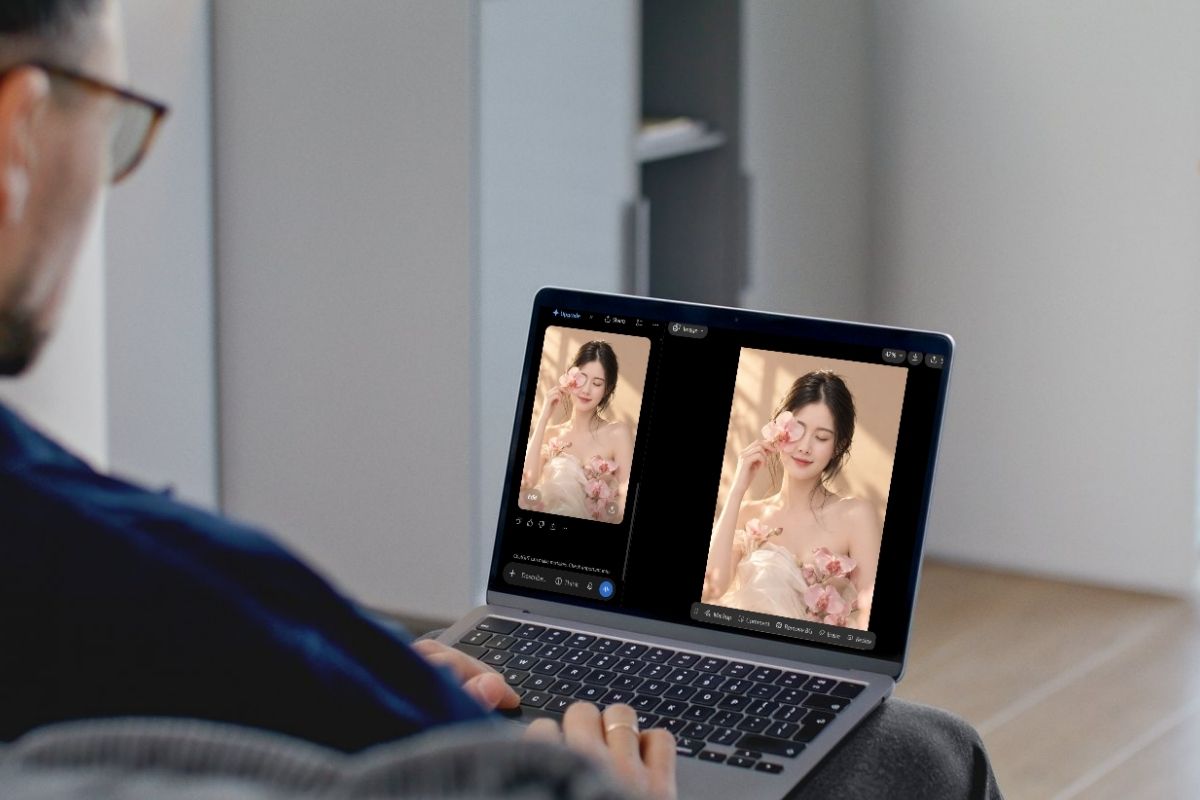
Hướng dẫn cách sử dụng ChatGPT Image 2.0
Nếu bạn muốn tạo hoặc nâng cấp hình ảnh nhanh chóng bằng AI, ChatGPT Image 2.0 là một công cụ rất dễ dùng. Chỉ cần vài bước cơ bản là bạn đã có thể bắt đầu.
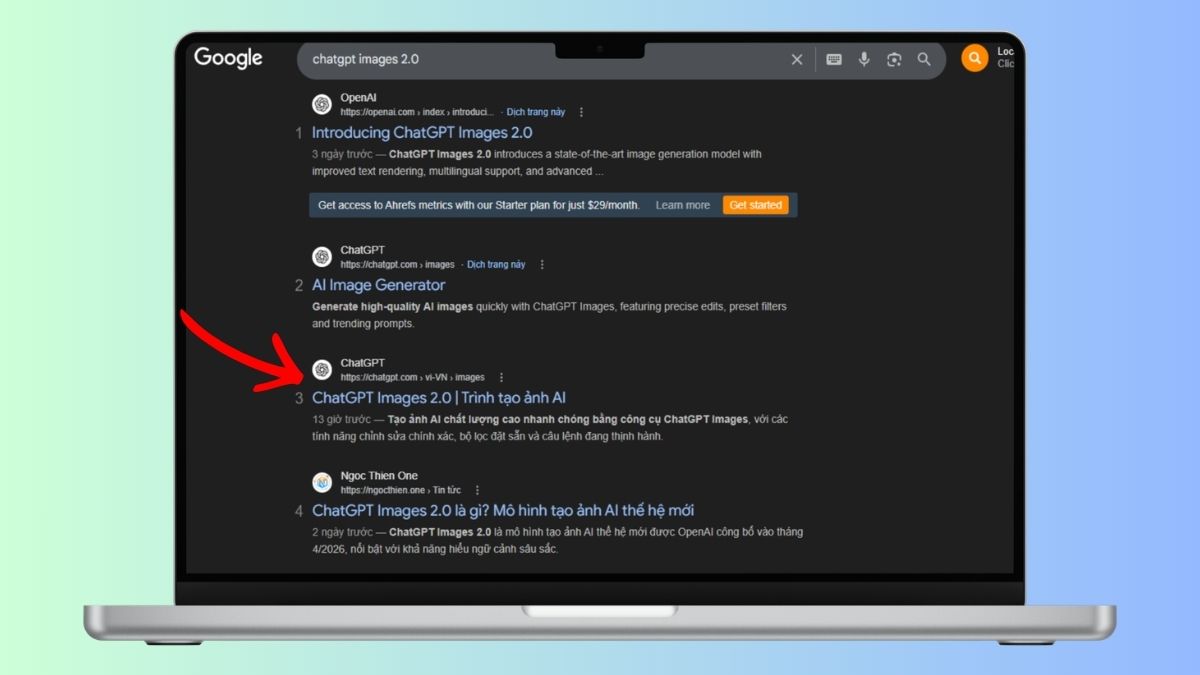
Bước 1: Mở ChatGPT Image 2.0
Truy cập Google, tìm kiếm “ChatGPT Image 2.0” rồi nhấn vào kết quả phù hợp, hoặc mở trực tiếp qua link chính thức "https://chatgpt.com/images/".
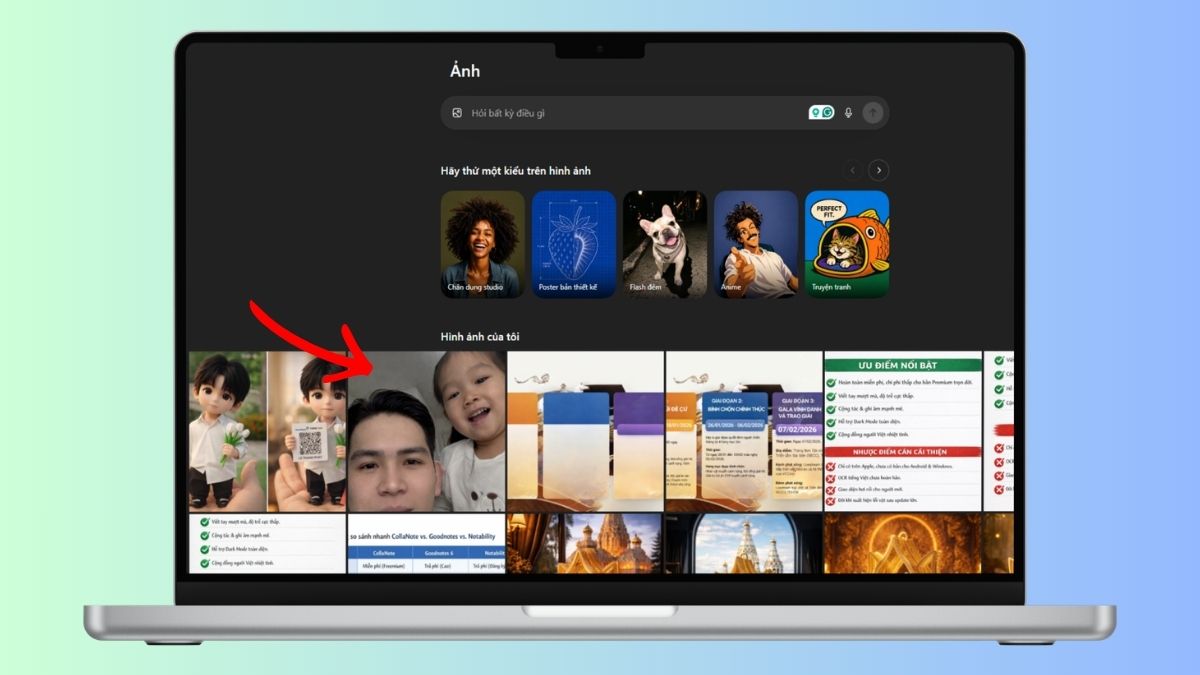
Bước 2: Tải ảnh lên
Trong giao diện chính, chọn ảnh bạn muốn chỉnh sửa hoặc nâng cấp chất lượng.
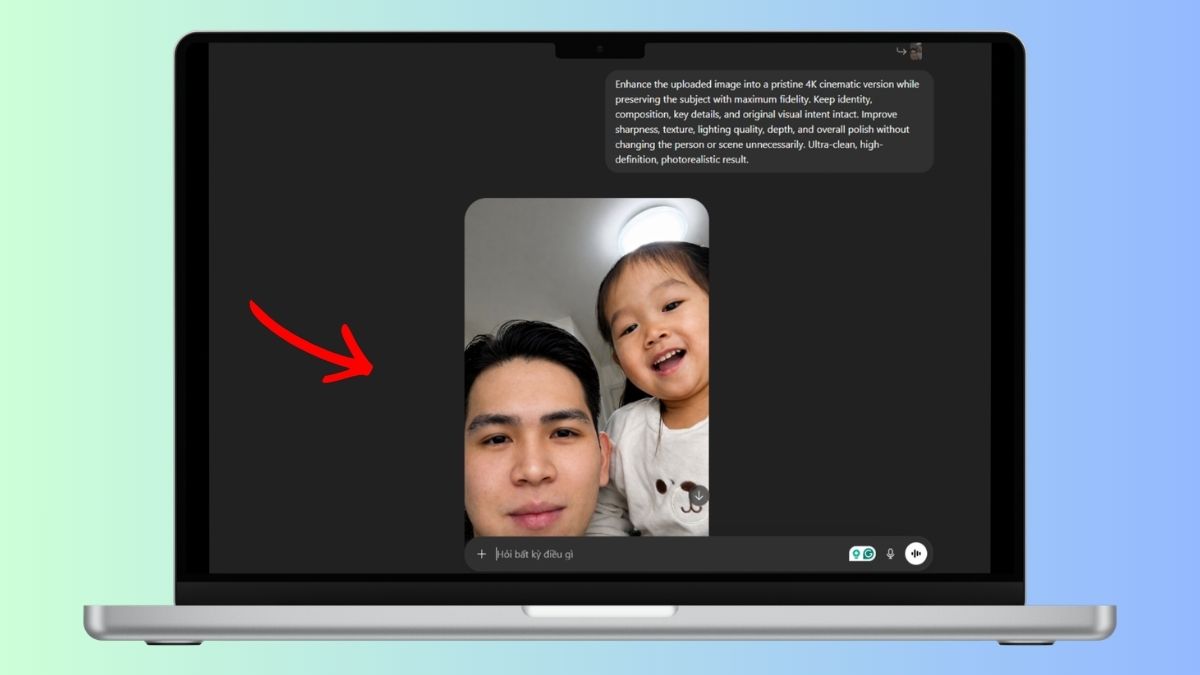
Bước 3: Nhập prompt và hoàn tất
Lựa chọn các prompt phù hợp bên dưới và dán vào khung nội dung. Sau đó, chờ hệ thống xử lý và trả về kết quả hình ảnh là hoàn tất.
Tổng hợp 18 prompt ứng dụng hữu ý với ChatGPT Image 2.0
Biến một bức ảnh thô thành poster quảng cáo 'triệu đô' chỉ bằng một vài dòng lệnh? Đó chỉ là một trong số rất nhiều điều bạn có thể làm. Cùng khám phá ngay 18 prompt ứng dụng ChatGPT Image 2.0 cực đỉnh giúp bạn nâng tầm mọi thiết kế!
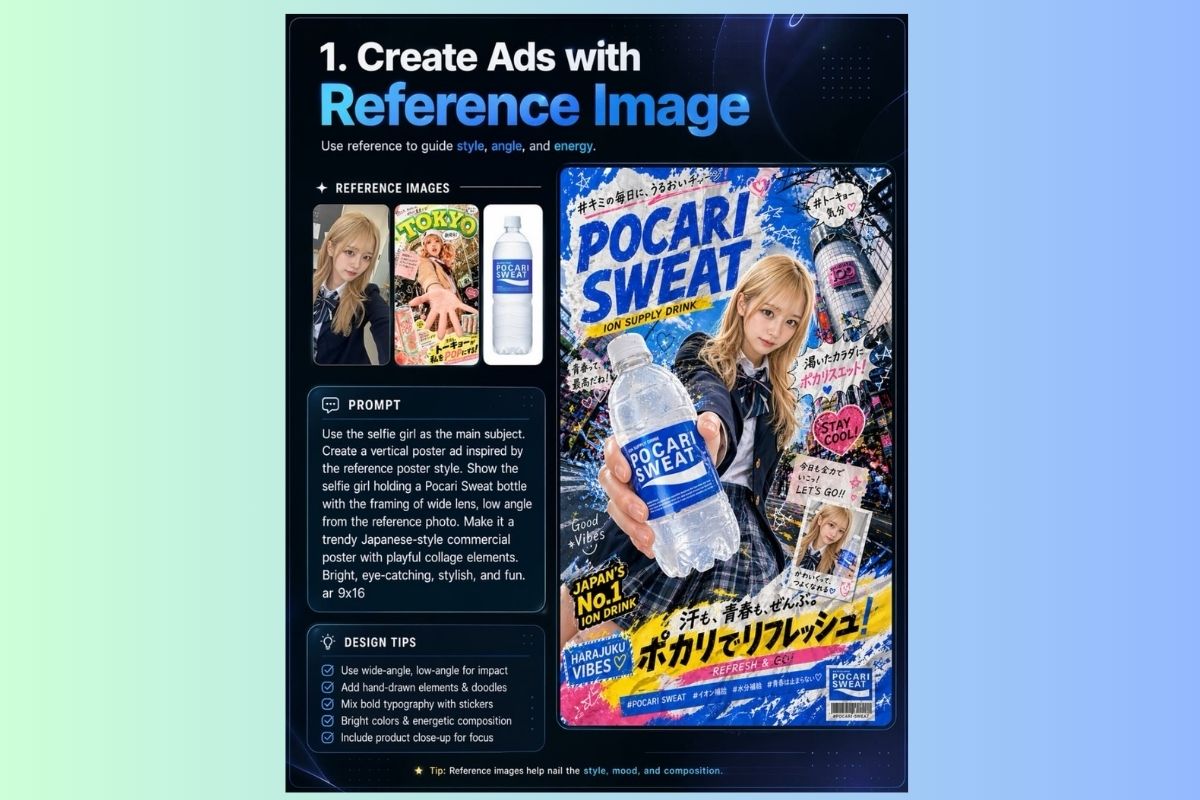
Tạo quảng cáo từ ảnh tham khảo
Dùng ảnh tham khảo để định hướng phong cách, góc chụp và năng lượng cho poster.
| Prompt | [Copy_Code code='Use the selfie girl as the main subject. Create a vertical poster ad inspired by the reference poster style. Show the selfie girl holding a Pocari Sweat bottle with the framing of a wide lens, low angle from the reference photo. Make it a trendy Japanese-style commercial poster with playful collage elements. Bright, eye-catching, stylish, and fun. ar 9x16'] |
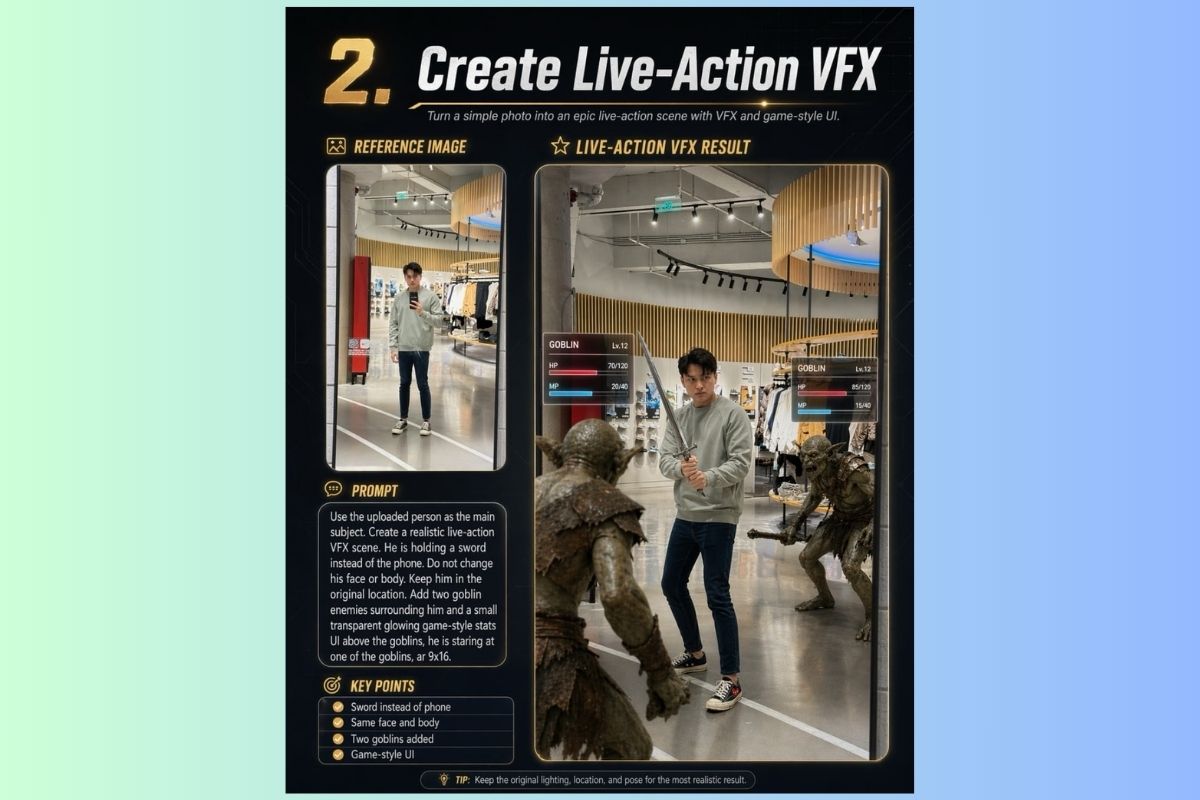
Tạo cảnh VFX Live-Action
Biến ảnh chụp thường ngày thành cảnh hành động hoành tráng với hiệu ứng game.
| Prompt | [Copy_Code code='Use the uploaded person as the main subject. Create a realistic live-action VFX scene. He is holding a sword instead of the phone. Do not change his face or body. Keep him in the original location. Add two goblin enemies surrounding him and a small transparent glowing game-style stats UI above the goblins; he is staring at one of the goblins. ar 9x16'] |
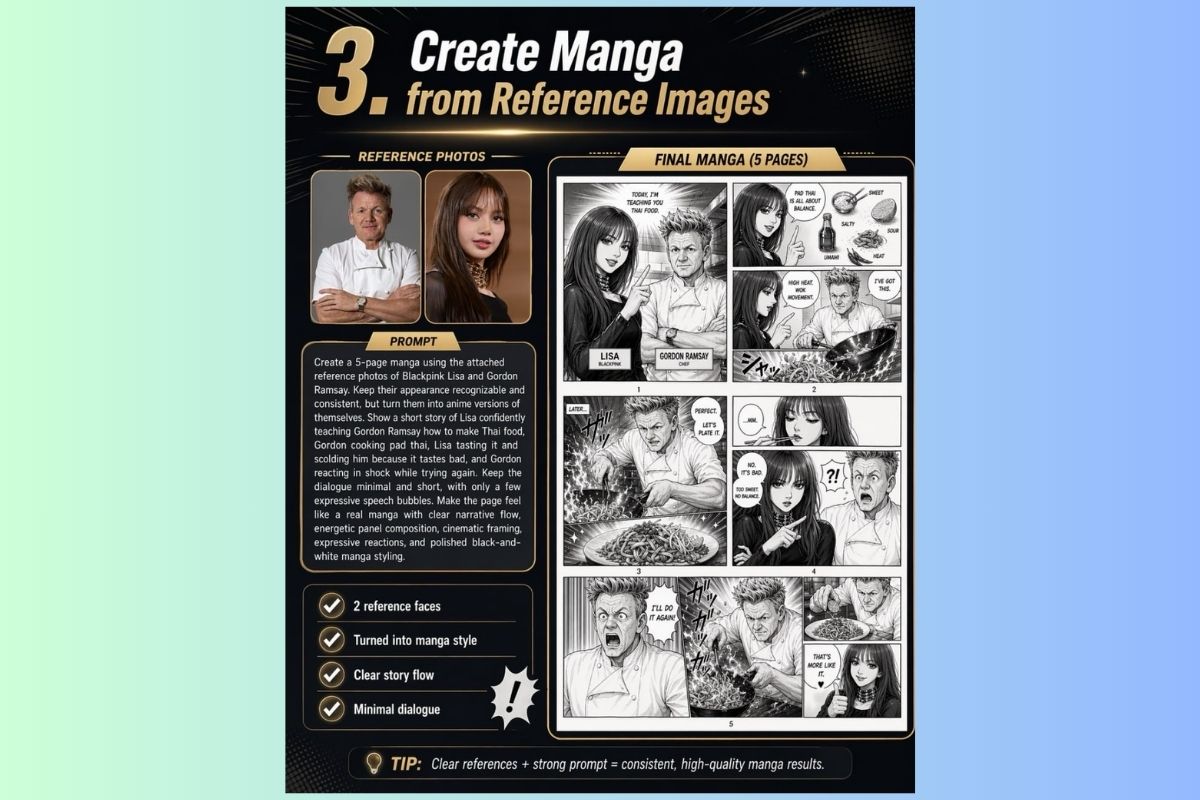
Tạo manga từ ảnh tham khảo
Chuyển đổi ảnh người thật thành nhân vật manga với câu chuyện rõ ràng.
| Prompt | [Copy_Code code='Create a 5-page manga using the attached reference photos of Blackpink Lisa and Gordon Ramsay. Keep their appearance recognizable and consistent, but turn them into anime versions of themselves. Show a short story of Lisa confidently teaching Gordon Ramsay how to make Thai food, Gordon cooking pad thai, Lisa tasting it and scolding him because it tastes bad, and Gordon reacting in shock while trying again. Keep the dialogue minimal and short, with only a few expressive speech bubbles. Make the page feel like a real manga with clear narrative flow, energetic panel composition, cinematic framing, expressive reactions, and polished black-and-white manga styling.'] |
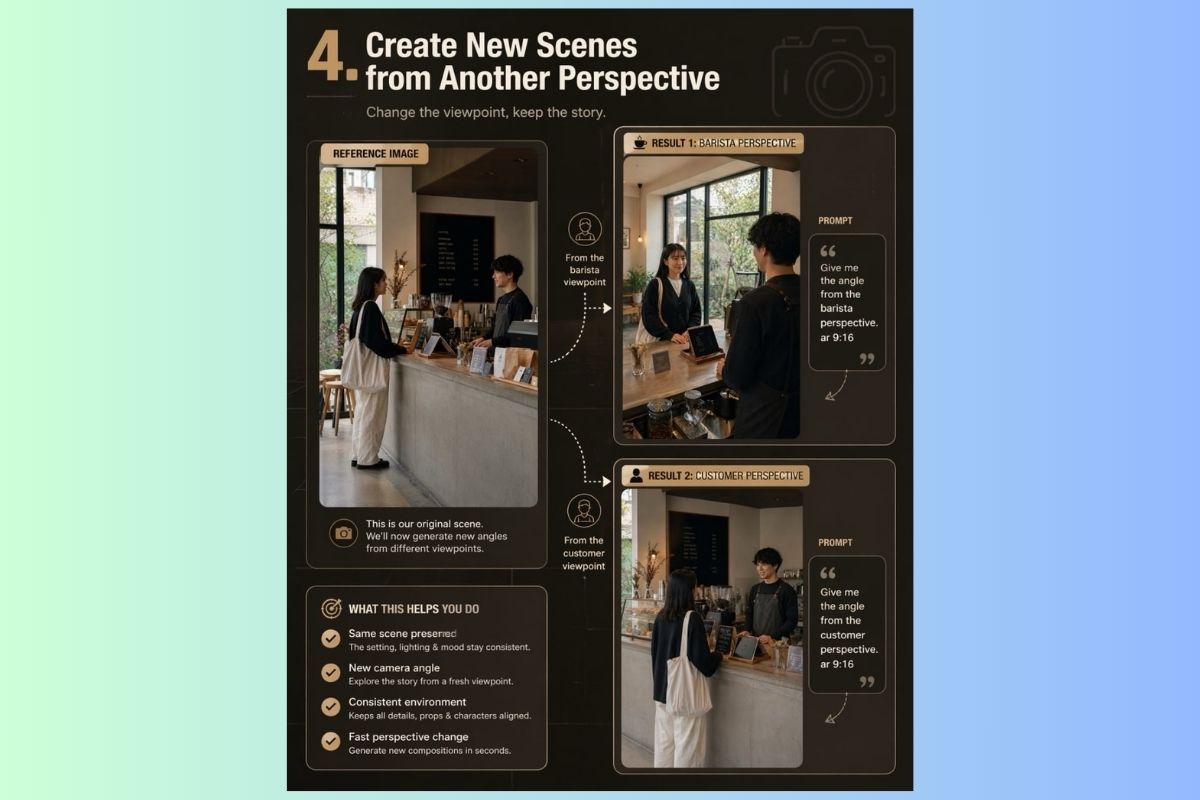
Tạo cảnh từ góc nhìn khác
Giữ nguyên câu chuyện, thay đổi góc nhìn camera để có hiệu ứng xa gần mới.
| Prompt (Góc barista) | [Copy_Code code='Give me the angle from the barista's perspective. ar 9:16'] |
| Prompt (Góc khách hàng) | [Copy_Code code='Give me the angle from the customer perspective. ar 9:16'] |
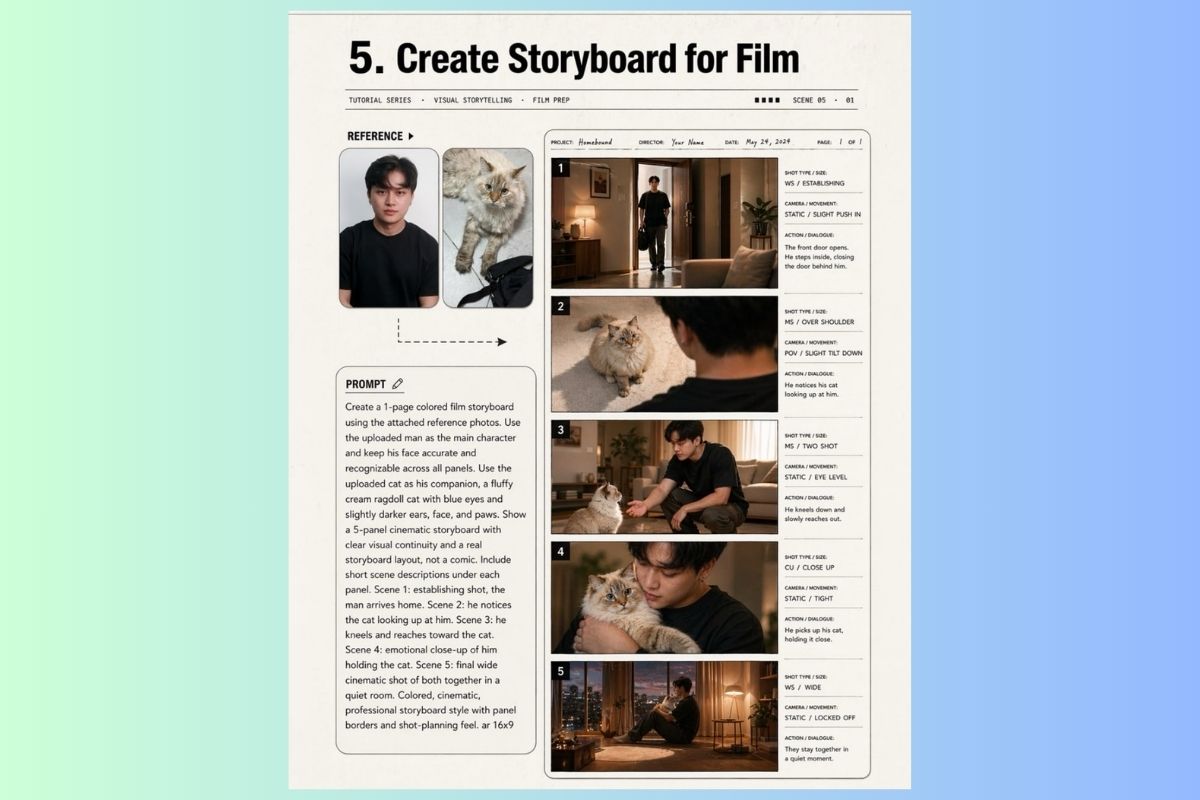
Tạo storyboard phim
Dùng ảnh người thật và thú cưng để dựng storyboard điện ảnh chuyên nghiệp.
| Prompt | [Copy_Code code='Create a 1-page colored film storyboard using the attached reference photos. Use the uploaded man as the main character and keep his face accurate and recognizable across all panels. Use the uploaded cat as his companion, a fluffy cream ragdoll cat with blue eyes and slightly darker ears, face, and paws. Show a 5-panel cinematic storyboard with clear visual continuity and a real storyboard layout, not a comic. Include short scene descriptions under each panel. Scene 1: establishing shot, the man arrives home. Scene 2: he notices the cat looking up at him. Scene 3: he kneels and reaches toward the cat. Scene 4: emotional close-up of him holding the cat. Scene 5: final wide cinematic shot of both together in a quiet room. Colored, cinematic, professional storyboard style with panel borders and shot-planning feel. ar 16x9'] |
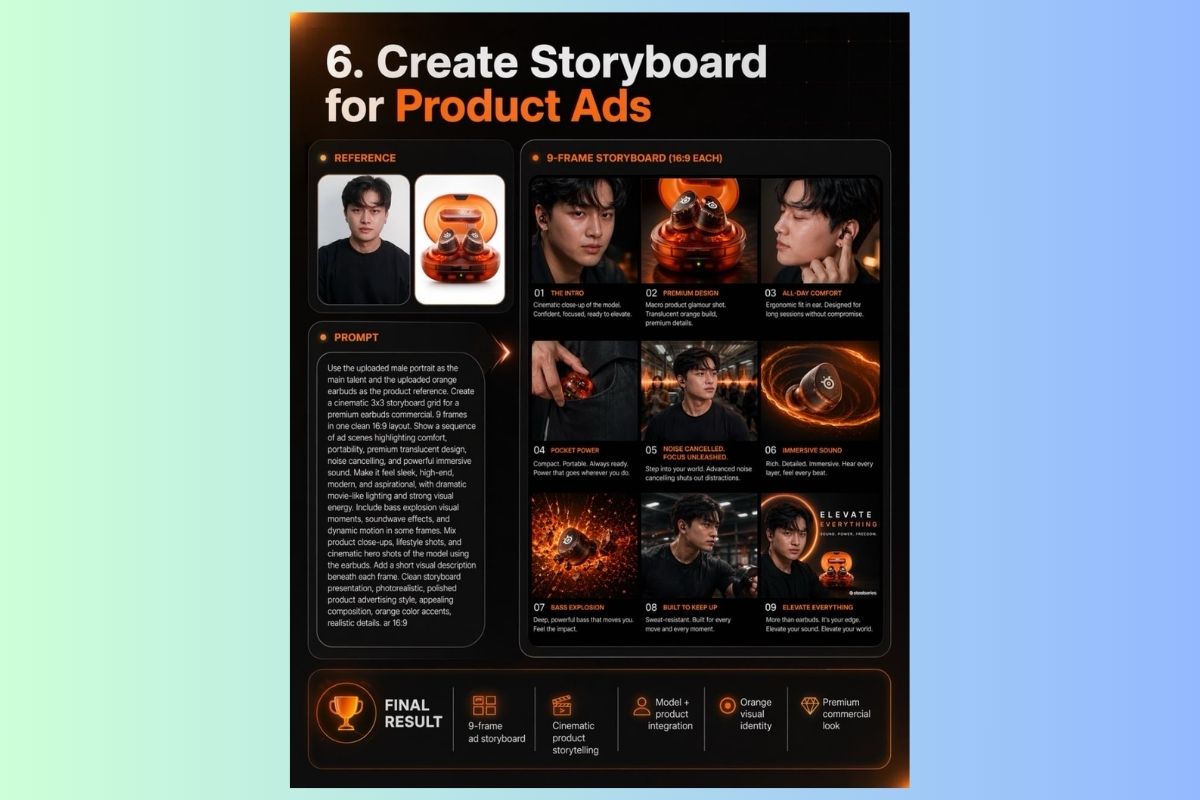
Tạo storyboard quảng cáo sản phẩm
Kết hợp gương mặt người mẫu và sản phẩm để tạo storyboard quảng cáo cao cấp.
| Prompt | [Copy_Code code='Use the uploaded male portrait as the main talent and the uploaded orange earbuds as the product reference. Create a cinematic 3x3 storyboard grid for a premium earbuds commercial. 9 frames in one clean 16:9 layout. Show a sequence of ad scenes highlighting comfort, portability, premium translucent design, noise cancelling, and powerful immersive sound. Make it feel sleek, high-end, modern, and aspirational, with dramatic movie-like lighting and strong visual energy. Include bass explosion visual moments, soundwave effects, and dynamic motion in some frames. Mix product close-ups, lifestyle shots, and cinematic hero shots of the model using the earbuds. Add a short visual description beneath each frame. Clean storyboard presentation, photorealistic, polished product advertising style, appealing composition, orange color accents, and realistic details. ar 16:9'] |
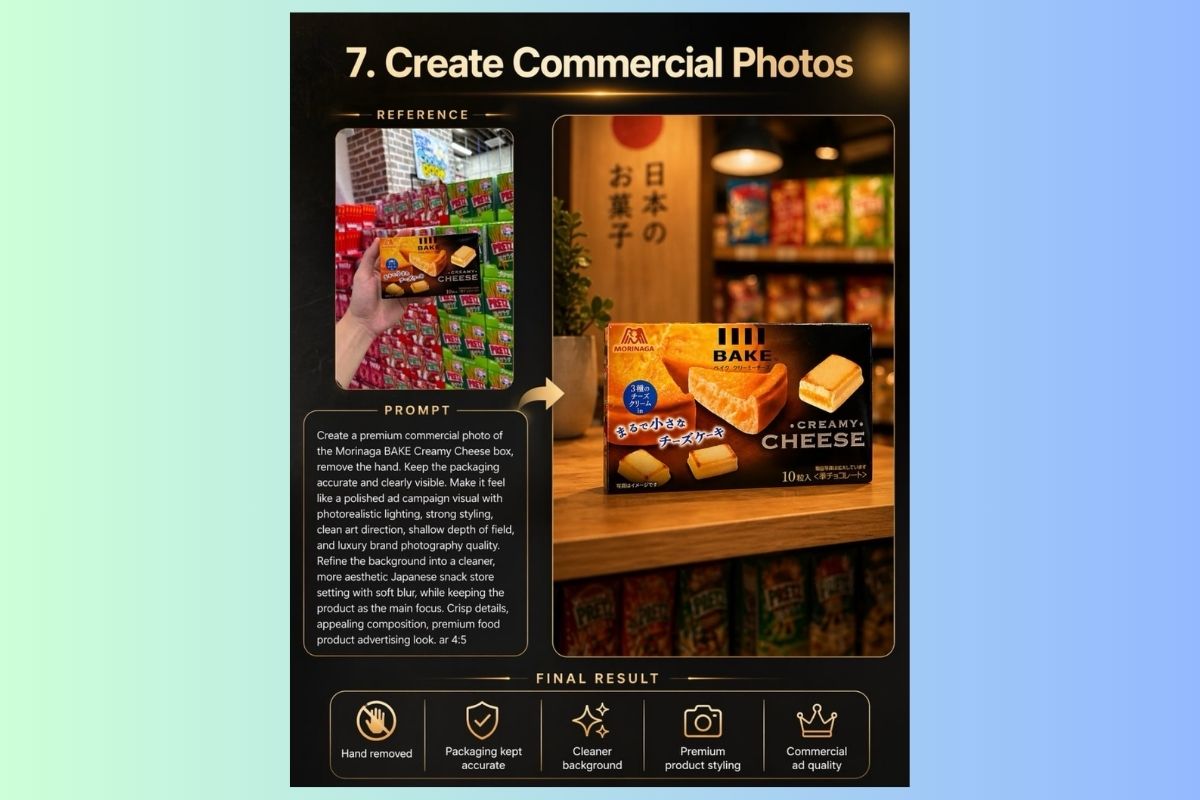
Tạo ảnh thương mại sản phẩm
Nâng cấp ảnh sản phẩm chụp tay lên thành hình ảnh quảng cáo cao cấp.
| Prompt | [Copy_Code code='Create a premium commercial photo of the Morinaga BAKE Creamy Cheese box, removing the hand. Keep the packaging accurate and clearly visible. Make it feel like a polished ad campaign visual with photorealistic lighting, strong styling, clean art direction, shallow depth of field, and luxury brand photography quality. Refine the background into a cleaner, more aesthetic Japanese snack store setting with soft blur, while keeping the product as the main focus. Crisp details, appealing composition, premium food product advertising look. ar 4:5'] |
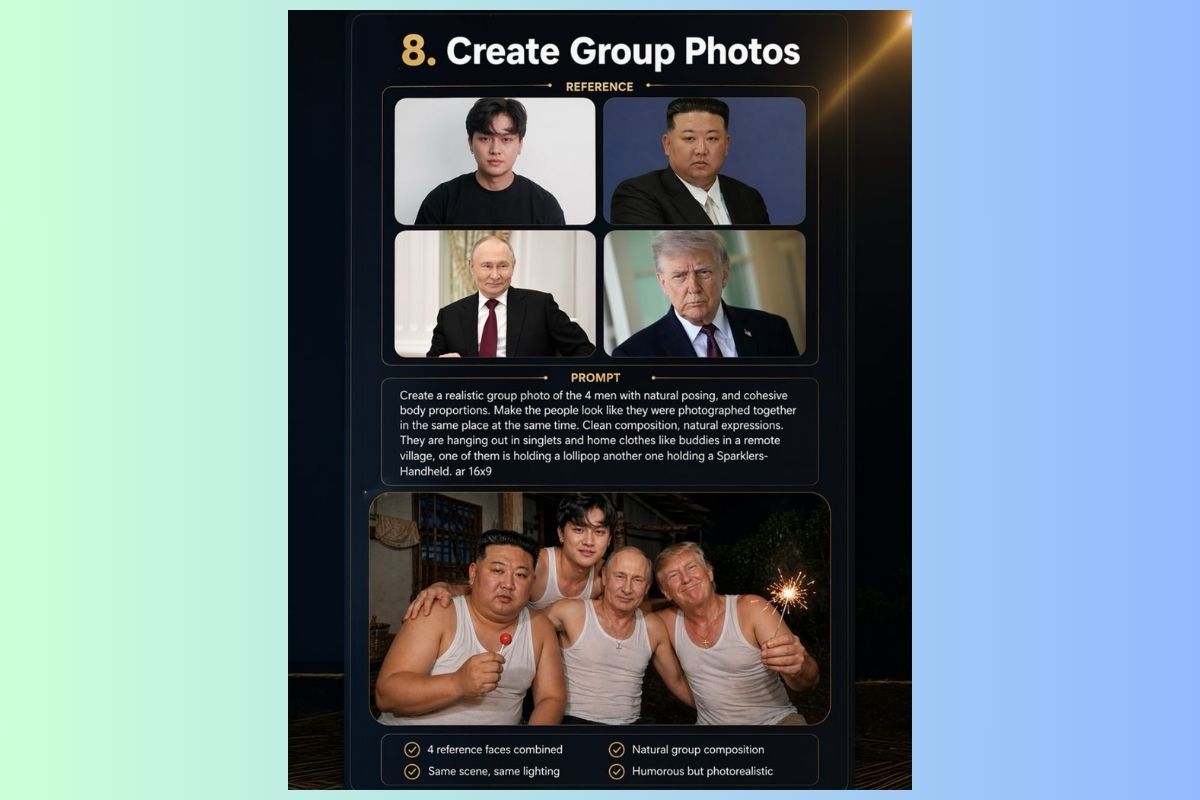
Tạo ảnh nhóm
Ghép nhiều khuôn mặt khác nhau thành một ảnh nhóm tự nhiên, cùng một khung cảnh.
| Prompt | [Copy_Code code='Create a realistic group photo of the 4 men with natural posing and cohesive body proportions. Make the people look like they were photographed together in the same place at the same time. Clean composition, natural expressions. They are hanging out in singlets and home clothes like buddies in a remote village, one of them is holding a lollipop, another one holding a Sparklers-Handheld. ar 16x9'] |
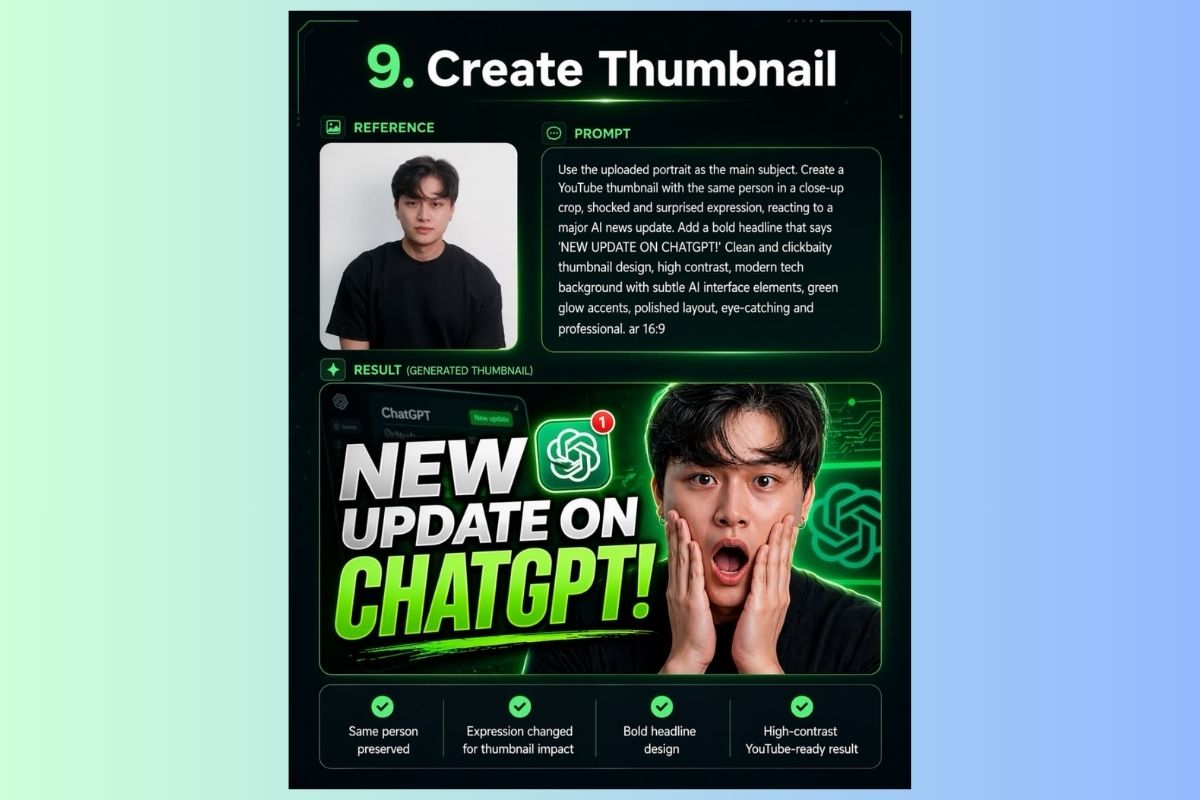
Tạo thumbnail YouTube
Biến ảnh chân dung thành thumbnail YouTube bắt mắt, chuyên nghiệp.
| Prompt | [Copy_Code code='Use the uploaded portrait as the main subject. Create a YouTube thumbnail with the same person in a close-up crop, shocked and surprised expression, reacting to a major AI news update. Add a bold headline that says 'NEW UPDATE ON CHATGPT!' Clean and clickbaity thumbnail design, high contrast, modern tech background with subtle AI interface elements, green glow accents, polished layout, eye-catching, and professional. ar 16:9'] |
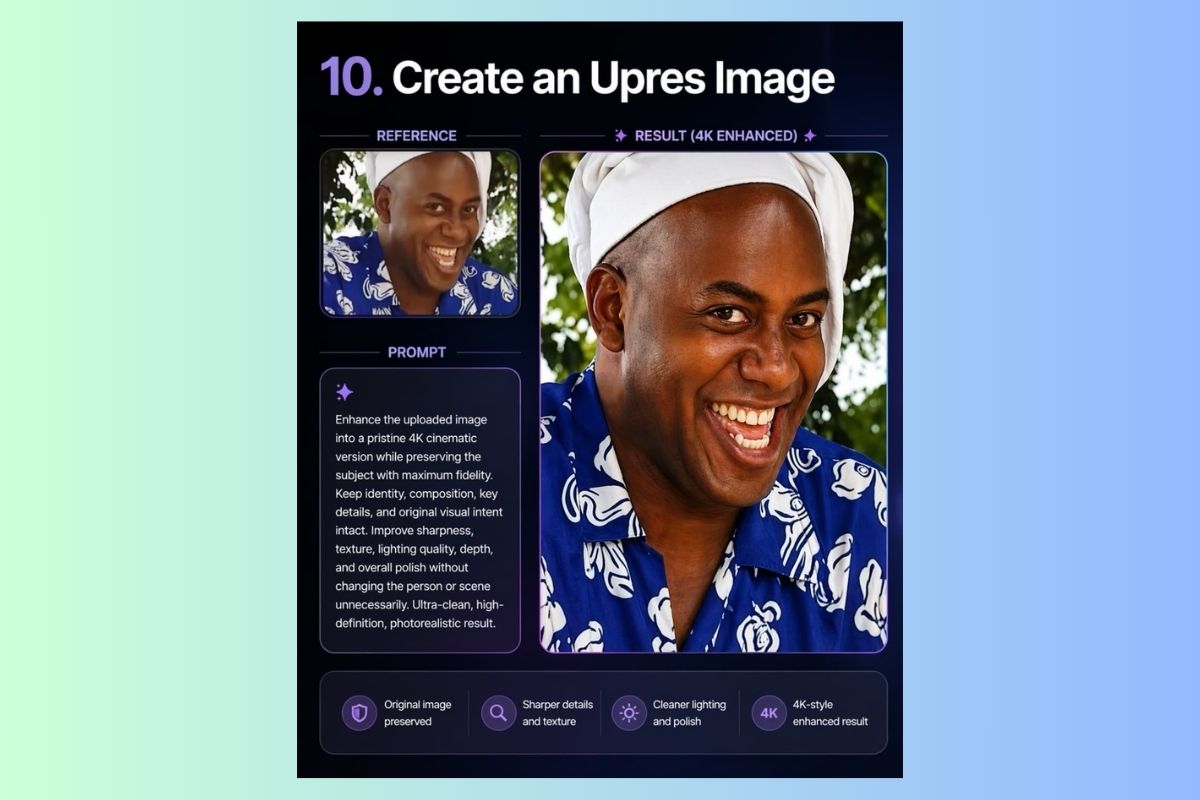
Nâng cấp độ phân giải ảnh
Tăng chất lượng ảnh lên chuẩn 4K, giữ nguyên nội dung gốc.
| Prompt | [Copy_Code code='Enhance the uploaded image into a pristine 4K cinematic version while preserving the subject with maximum fidelity. Keep identity, composition, key details, and original visual intent intact. Improve sharpness, texture, lighting quality, depth, and overall polish without changing the person or scene unnecessarily. Ultra-clean, high-definition, photorealistic result.'] |
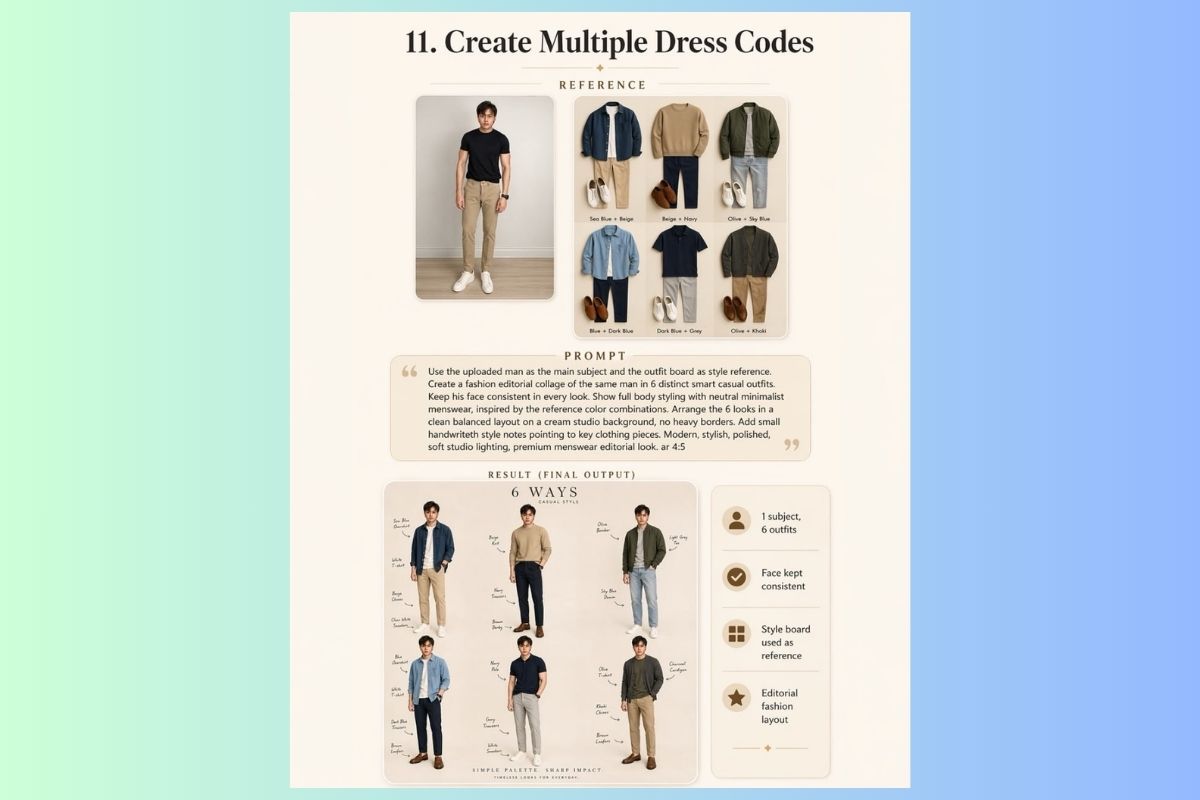
Tạo nhiều phong cách thời trang
Mặc thử nhiều outfit khác nhau lên cùng một người trong một layout editorial.
| Prompt | [Copy_Code code='Use the uploaded man as the main subject and the outfit board as style reference. Create a fashion editorial collage of the same man in 6 distinct smart casual outfits. Keep his face consistent in every look. Show full body styling with neutral minimalist menswear, inspired by the reference color combinations. Arrange the 6 looks in a clean, balanced layout on a cream studio background, no heavy borders. Add small handwritten style notes pointing to key clothing pieces. Modern, stylish, polished, soft studio lighting, premium menswear editorial look. ar 4:5'] |
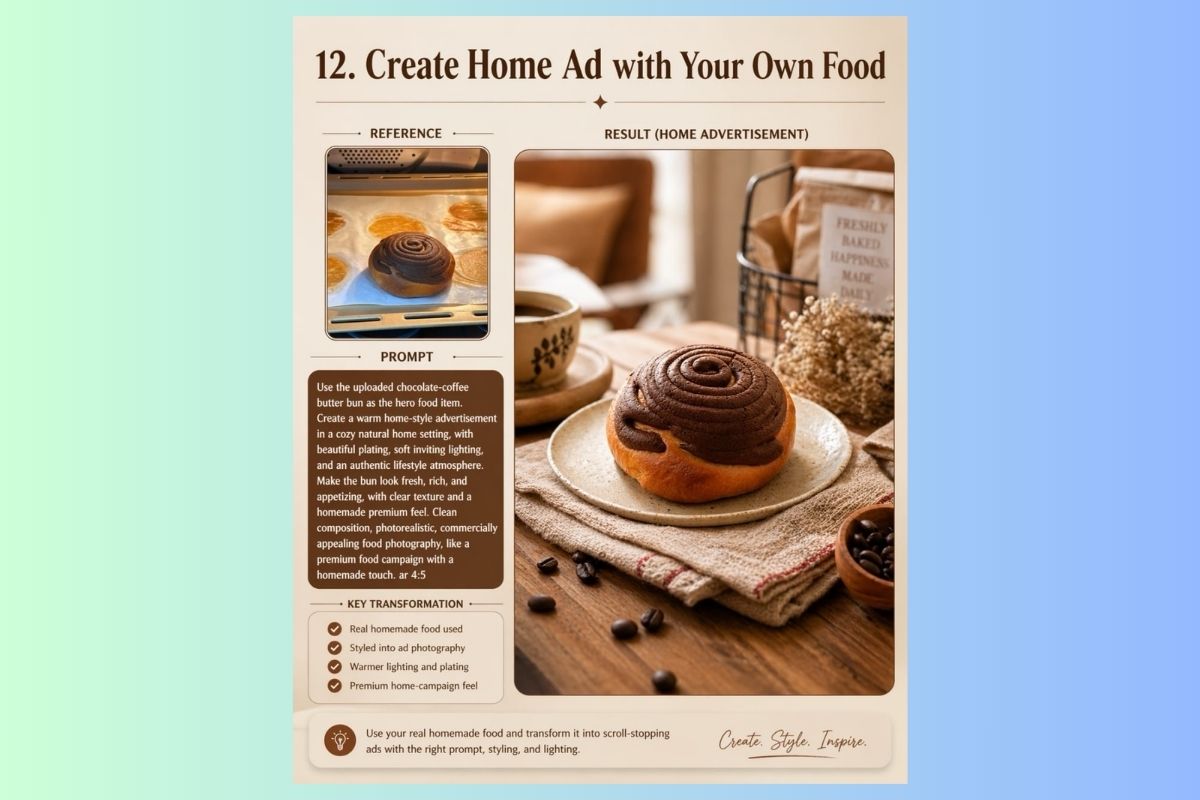
Tạo quảng cáo đồ ăn tự làm
Biến ảnh đồ ăn tự nấu tại nhà thành hình ảnh quảng cáo thực phẩm chuyên nghiệp.
| Prompt | [Copy_Code code='Use the uploaded chocolate-coffee butter bun as the hero food item. Create a warm home-style advertisement in a cozy, natural home setting, with beautiful plating, soft, inviting lighting, and an authentic lifestyle atmosphere. Make the bun look fresh, rich, and appetizing, with clear texture and a homemade premium feel. Clean composition, photorealistic, commercially appealing food photography, like a premium food campaign with a homemade touch. ar 4:5'] |
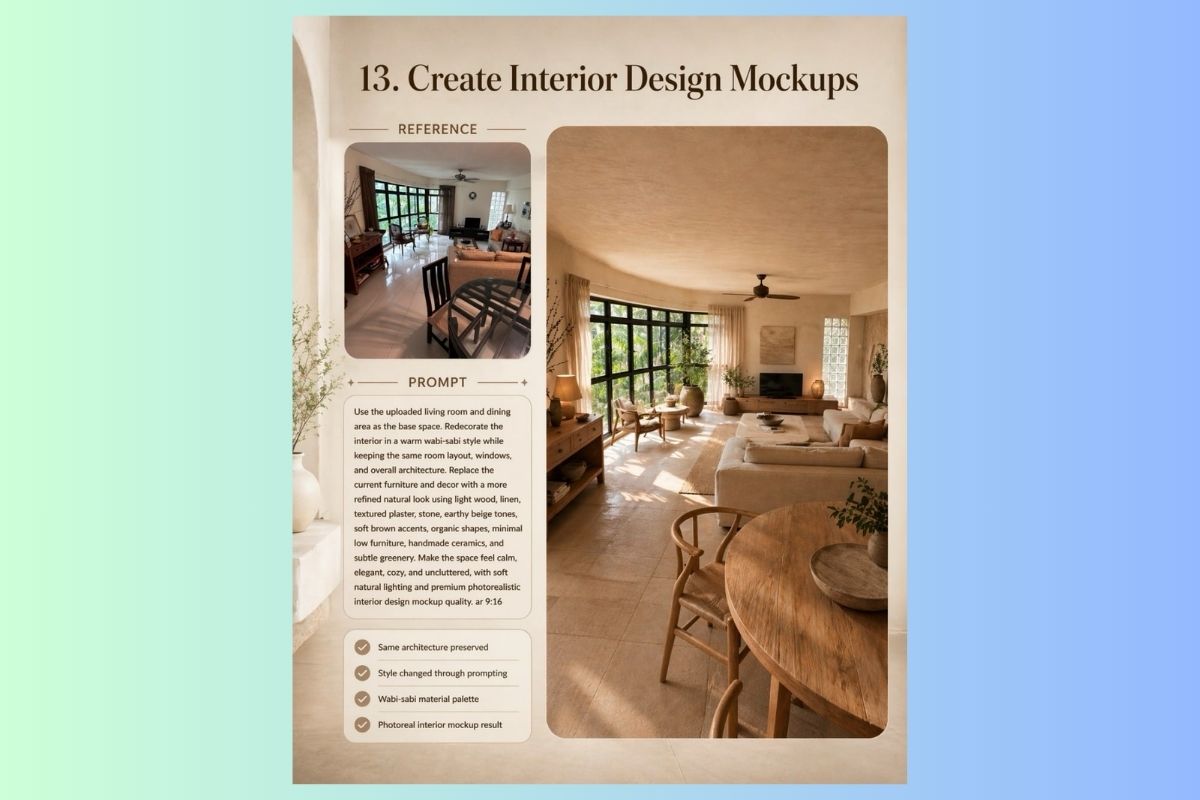
Tạo mockup thiết kế nội thất
Tái thiết kế phòng thực tế sang phong cách mới trong khi giữ nguyên kiến trúc.
| Prompt | [Copy_Code code='Use the uploaded living room and dining area as the base space. Redecorate the interior in a warm wabi-sabi style while keeping the same room layout, windows, and overall architecture. Replace the current furniture and decor with a more refined natural look using light wood, linen, textured plaster, stone, earthy beige tones, soft brown accents, organic shapes, minimal low furniture, handmade ceramics, and subtle greenery. Make the space feel calm, elegant, cozy, and uncluttered, with soft natural lighting and premium photorealistic interior design mockup quality. ar 9:16'] |
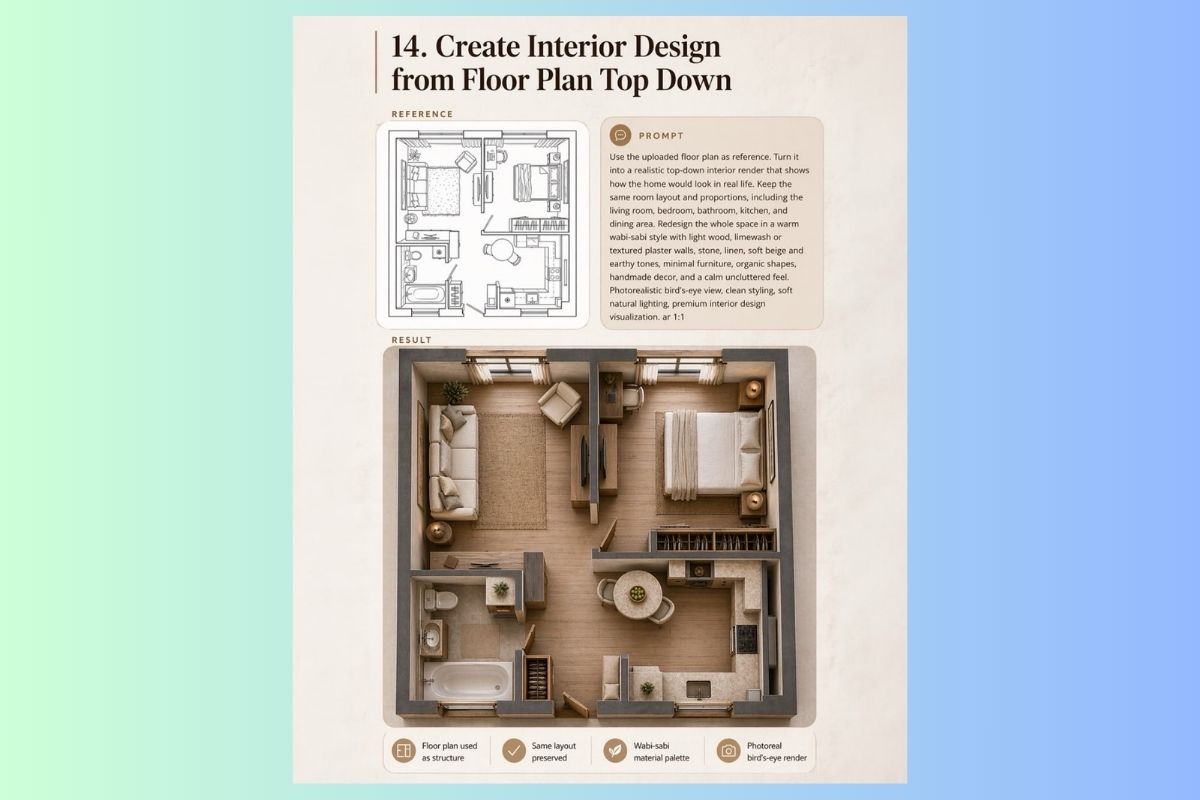
Tạo thiết kế nội thất từ mặt bằng
Chuyển đổi bản vẽ mặt bằng 2D thành hình ảnh render nội thất bird's-eye view thực tế.
| Prompt | [Copy_Code code='Use the uploaded floor plan as a reference. Turn it into a realistic top-down interior render that shows how the home would look in real life. Keep the same room layout and proportions, including the living room, bedroom, bathroom, kitchen, and dining area. Redesign the whole space in a warm wabi-sabi style with light wood, limewash or textured plaster walls, stone, linen, soft beige and earthy tones, minimal furniture, organic shapes, handmade decor, and a calm uncluttered feel. Photorealistic bird's-eye view, clean styling, soft natural lighting, premium interior design visualization. ar 1:1'] |
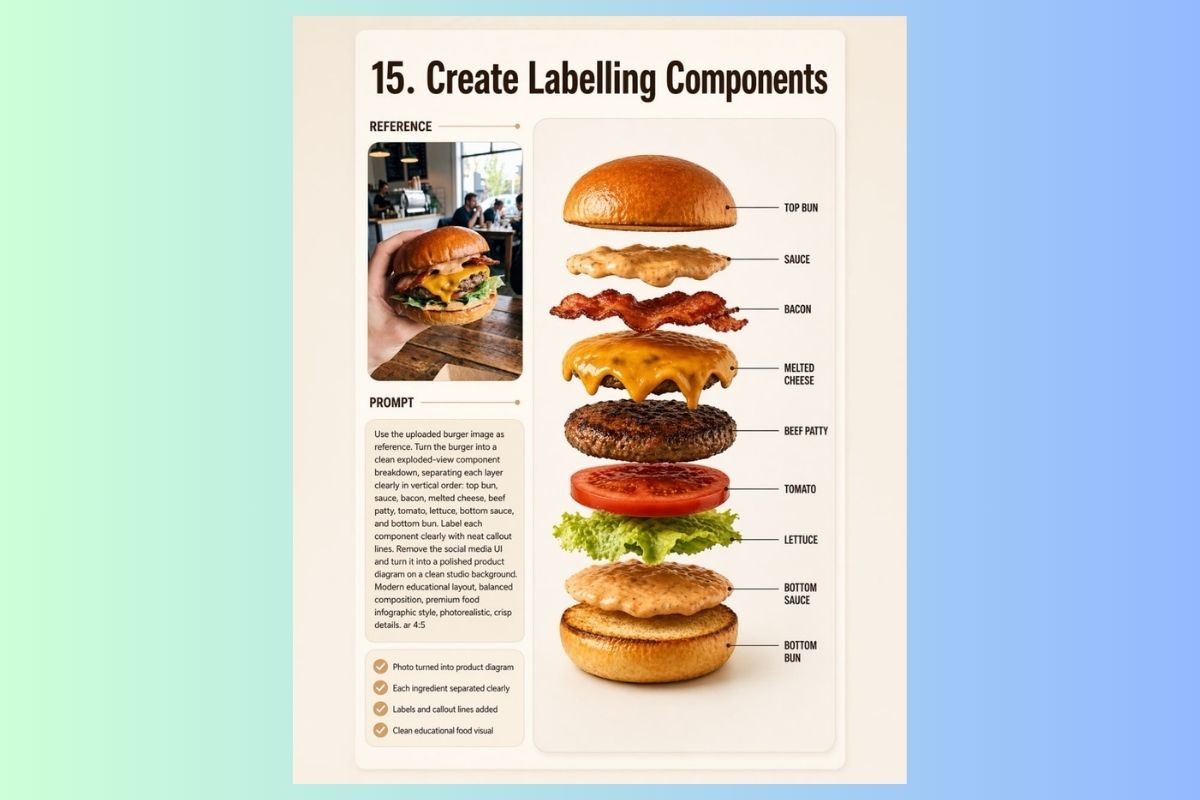
Tạo sơ đồ thành phần (Labelling)
Tách rời các thành phần sản phẩm thành sơ đồ exploded-view có nhãn chú thích rõ ràng.
| Prompt | [Copy_Code code='Use the uploaded burger image as a reference. Turn the burger into a clean exploded-view component breakdown, separating each layer clearly in vertical order: top bun, sauce, bacon, melted cheese, beef patty, tomato, lettuce, bottom sauce, and bottom bun. Label each component clearly with neat callout lines. Remove the social media UI and turn it into a polished product diagram on a clean studio background. Modern educational layout, balanced composition, premium food infographic style, photorealistic, crisp details. ar 4:5'] |
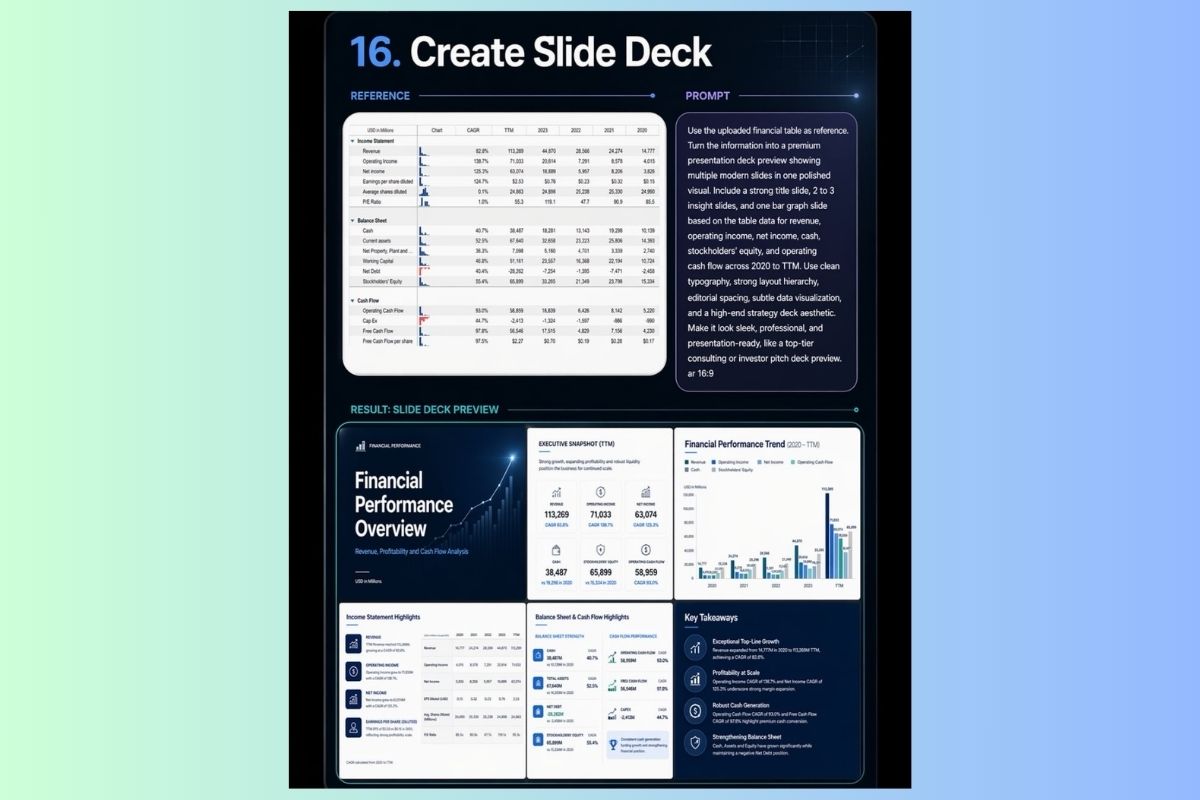
Tạo slide deck
Chuyển đổi dữ liệu bảng tài chính thành bộ slide thuyết trình cao cấp.
| Prompt | [Copy_Code code='Use the uploaded financial table as a reference. Turn the information into a premium presentation deck preview showing multiple modern slides in one polished visual. Include a strong title slide, 2 to 3 insight slides, and one bar graph slide based on the table data for revenue, operating income, net income, cash, stockholders' equity, and operating cash flow across 2020 to TTM. Use clean typography, strong layout hierarchy, editorial spacing, subtle data visualization, and a high-end strategy deck aesthetic. Make it look sleek, professional, and presentation-ready, like a top-tier consulting or investor pitch deck preview. ar 16:9'] |
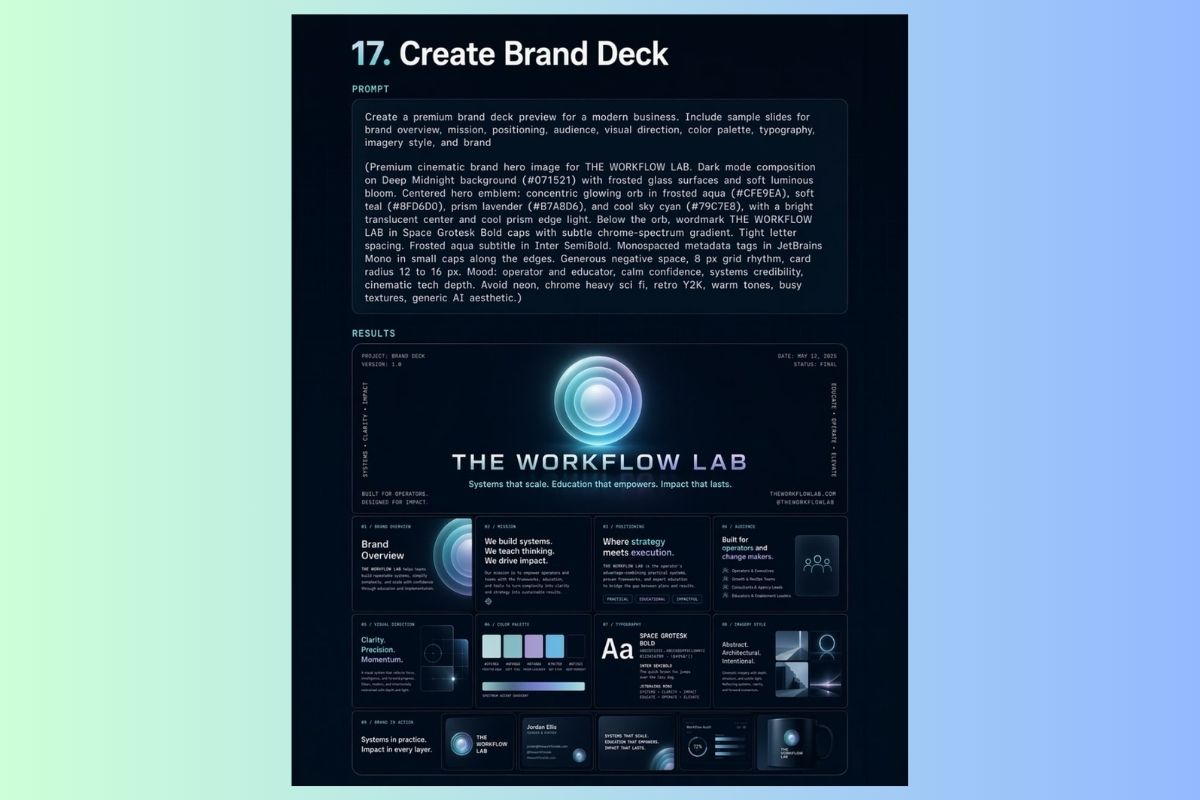
Tạo brand deck
Xây dựng bộ brand identity đầy đủ chỉ từ một prompt chi tiết.
| Prompt | [Copy_Code code='Create a premium brand deck preview for a modern business. Include sample slides for brand overview, mission, positioning, audience, visual direction, color palette, typography, imagery style, and brand. (Premium cinematic brand hero image for THE WORKFLOW LAB. Dark mode composition on Deep Midnight background (#071521) with frosted glass surfaces and soft luminous bloom. Centered hero emblem: concentric glowing orb in frosted aqua (#CFE9EA), soft teal (#8FD6D0), prism lavender (#B7A8D6), and cool sky cyan (#79C7E8), with a bright translucent center and cool prism edge light. Below the orb, wordmark THE WORKFLOW LAB in Space Grotesk Bold caps with subtle chrome-spectrum gradient. Tight letter spacing. Frosted aqua subtitle in Inter SemiBold. Monospaced metadata tags in JetBrains Mono in small caps along the edges. Generous negative space, 8px grid rhythm, card radius 12 to 16px. Mood: operator and educator, calm confidence, systems credibility, cinematic tech depth. Avoid neon, chrome-heavy sci-fi, retro Y2K, warm tones, busy textures, and generic AI aesthetic.)'] |
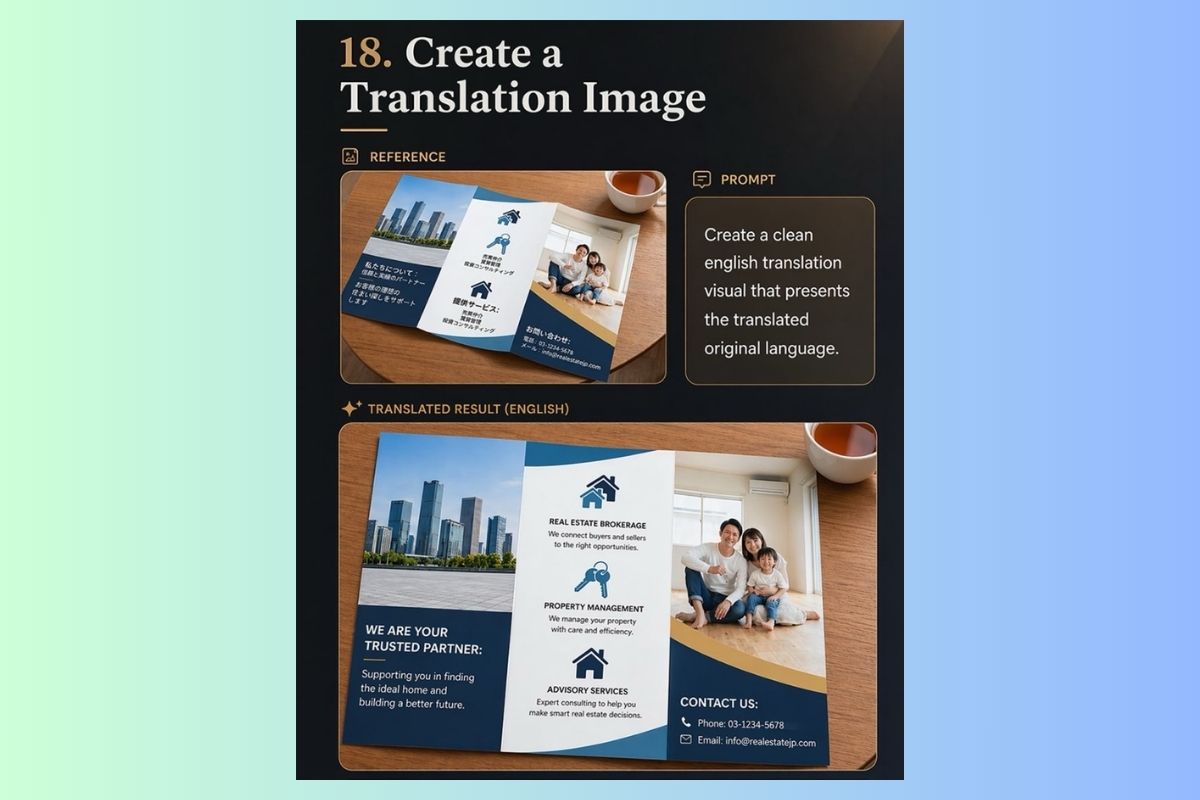
Tạo ảnh dịch thuật
Dịch nội dung văn bản trong ảnh thiết kế sang ngôn ngữ khác, giữ nguyên layout.
| Prompt | [Copy_Code code='Create a clean English translation visual that presents the translated original language.'] |
Lưu ý quan trọng khi sử dụng ChatGPT Image 2.0
Để khai thác tối đa sức mạnh của công cụ này, bạn cần ghi nhớ một vài nguyên tắc vàng:
- Cung cấp câu lệnh càng chi tiết, kết quả càng chính xác: Đừng chỉ nói "tạo ảnh một con mèo". Hãy mô tả chi tiết: "tạo ảnh một con mèo Anh lông ngắn màu xám đang nằm cuộn tròn trên một chiếc ghế sofa màu xanh rêu, ánh nắng chiều chiếu xiên qua cửa sổ, phong cách nhiếp ảnh chân thực".
- Sử dụng "từ khóa ma thuật": Thêm các từ khóa về phong cách như "photorealistic", "cinematic lighting", "digital art", "minimalist", "watercolor style"… sẽ giúp AI định hình kết quả đúng ý bạn hơn.
- Tận dụng khả năng chỉnh sửa: Đừng ngại yêu cầu AI tinh chỉnh lại hình ảnh. Đây là một quá trình sáng tạo lặp đi lặp lại. Hãy xem AI như một cộng sự, không phải một cỗ máy chỉ biết làm theo lệnh.
- Luôn kiểm tra lại thông tin quan trọng: Khi sử dụng AI để phân tích dữ liệu (như hợp đồng, số liệu), hãy luôn kiểm tra lại các thông tin quan trọng bằng mắt thường. AI rất thông minh nhưng không phải lúc nào cũng hoàn hảo 100%.
- Tôn trọng bản quyền và quyền riêng tư: Tránh tải lên những hình ảnh nhạy cảm, thông tin cá nhân của người khác, hoặc yêu cầu AI tạo ra những hình ảnh vi phạm bản quyền.
Để khai thác tối đa ChatGPT Image 2.0, một màn hình chuẩn màu là yếu tố quan trọng. Các dòng màn hình đồ họa tại CellphoneS giúp hiển thị chính xác màu sắc, hạn chế sai lệch khi thiết kế, chỉnh sửa và xuất file hình ảnh.
[Product_Listing categoryid="1232" propertyid="" customlink="https://cellphones.com.vn/man-hinh/do-hoa.html" title="Danh sách Màn hình đồ họa đang được quan tâm nhiều tại CellphoneS"]
Qua bài tổng hợp 18 prompt ứng dụng hữu ích với ChatGPT Image 2.0, minh chứng một điều là AI image generation không giới hạn ở việc "vẽ tranh đẹp", mà nó đã trở thành công cụ sản xuất nội dung thực chiến cho quảng cáo, phim ảnh, thiết kế và thương mại. Điểm mấu chốt để có kết quả tốt luôn nằm ở chất lượng của prompt: càng rõ về subject, style, composition và output format, AI càng trả về đúng thứ bạn cần.
Hãy lưu lại bộ sưu tập này, thử nghiệm với nội dung của riêng bạn và biến mỗi ý tưởng thành hình ảnh thực sự.
Nguồn: Terencesia
Xem thêm:
- Codex ChatGPT là gì? Cách sử dụng mới nhất 2026
- ChatGPT Pro là gì? Tính năng và Bảng giá mới nhất 2026
- Các bài viết liên quan đến: ChatGPT


Bình luận (0)